HubSpot Starter Plan Automation: What Small Businesses Can (and Can't) Automate Without Upgrading
If you're running a small or growing business on HubSpot's Starter plan, you've probably hit a familiar wall: you want to automate follow-up emails, but the tools you'd expect to use for that — like Sequences — are gated behind Sales Hub Pro. That's the exact gap FlowNer was built to close.
This is one of the most common points of confusion for SMBs evaluating HubSpot. You're not imagining it, and you're not missing a setting. Here's what's actually included in Starter, what isn't, and what your realistic options are for automating outreach without jumping straight to a Pro subscription.
Does HubSpot Starter have sequences?
No — not natively. HubSpot Sequences, the feature that lets a sales rep enroll a contact into a multi-step, timed series of emails, is a Sales Hub Pro feature. On Starter, you get core CRM functionality, basic email sending, and simple automation through forms and lists, but the sequence-building interface itself isn't available.
This trips up a lot of small teams because Sequences is one of those features that gets mentioned constantly in HubSpot tutorials and onboarding content — without always being clear that it requires a plan upgrade.
Why HubSpot Sales Hub Pro is required for sequences
HubSpot structures its pricing in tiers partly around who the feature is built for. Sequences was designed for sales teams doing high-volume, repeatable outreach — cold prospecting, demo follow-ups, renewal reminders — so HubSpot bundles it with other Pro-tier sales tools like advanced reporting, custom deal stages, and playbooks.
For an SMB, that bundling is the problem. You might only need the automated follow-up piece. Paying for an entire Pro tier — often several times the cost of Starter — just to unlock one feature isn't always a reasonable trade-off, especially for a small team without a large HubSpot budget.
This is exactly the gap that's pushed a lot of small businesses to look for HubSpot Starter plan automation options outside HubSpot's own upgrade path.
The cheapest way to automate HubSpot follow-ups
If you're trying to keep costs down while still automating outreach, there are generally three paths SMBs consider:
1. Manual workarounds.
Some teams try to replicate sequence behavior with saved email templates and calendar reminders. It works in theory, but it doesn't scale — someone still has to remember to send each step, and personalization has to be done by hand every time.
2. HubSpot Workflows.
Workflows are available on Starter for some use cases, but the more useful email-automation workflow types are also gated to higher-tier plans, and workflow-building isn't designed the same way sequence-building is — it's built for marketing automation logic, not the simple "enroll a contact, send email, wait, send another" pattern that sales teams actually want.
3. Third-party apps built for Starter accounts.
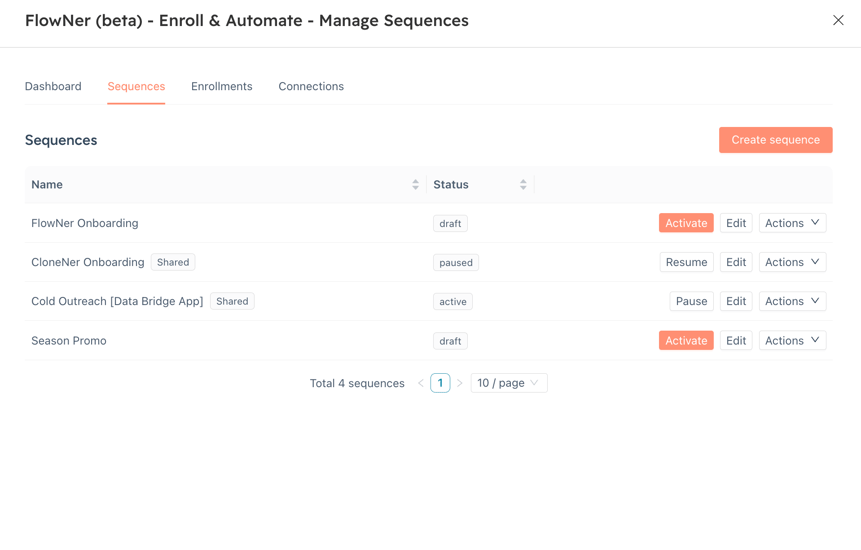
This is where apps like FlowNer fit in. Rather than replacing HubSpot's CRM or requiring a plan upgrade, FlowNer adds a sequence-style automation layer on top of a Starter (or Pro) account — enrollment, multi-step email/wait sequencing, and personalization — without touching your HubSpot subscription tier at all.
Worth noting: FlowNer also covers a second upgrade path SMBs run into. In native HubSpot, triggering sequence enrollment automatically from workflow logic — say, when a deal moves stage, a lead qualifies, or an owner changes — is normally a Sales Hub Enterprise feature. FlowNer brings that same workflow-based enrollment (and automatic unenrollment, so contacts don't keep getting outdated or duplicate outreach once conditions change) to lower tiers, and it works across contact, deal, company, ticket, and custom object workflows — not just contact records.
For SMBs, this route is usually the cheapest way to get real automation, because you're paying for the one feature you actually need instead of an entire tier of tools you won't use.
How to use sequences on HubSpot Starter (with a third-party app)
If you go the app route, the general workflow looks like this, regardless of which tool you choose:
- Connect your mailbox. The app needs permission to read, compose, and send from the account your contacts will recognize — this keeps replies landing in a real inbox, not a separate system.
- Build your sequence. Add email steps and wait steps in the order you want them sent. Good tools let you personalize each email (first name, company, job title) automatically instead of writing a version for every contact.
- Set your sending rules. Business hours, send windows, and calendar-based waits (so a 2-day wait counts from when the previous email actually sent, not from when the contact was enrolled) all matter for keeping outreach professional and well-timed.
- Enroll contacts. Either one at a time or from a list/segment, so you're not manually adding people one by one.
- Track results. Opens, replies, bounces, and unsubscribes should be visible somewhere central — this is what turns "automation" into something you can actually manage, rather than a black box.
This is the same basic process FlowNer uses inside HubSpot: connect a mailbox, build a sequence with email and wait steps, enroll contacts or a full list, and monitor everything from a dashboard — all without needing Sales Hub Pro.
One related tip worth a quick mention: automating outreach means more activity moving through your inbox, so it's worth keeping an eye on inbound noise too. Tools like Inbox Spam Filter, a HubSpot technology partner app, add AI-based spam scoring to HubSpot's Shared Inbox so junk doesn't clutter your CRM as your outreach volume grows.
What this actually saves an SMB
Running the numbers makes the case concrete. For a 5-seat sales team, upgrading every seat to Sales Hub Pro (including a typical first-year onboarding fee) runs close to $6,900/year. Running those same seats on Sales Hub Starter plus FlowNer comes out closer to $1,548/year — a reduction of roughly 78%, or about $5,350 saved annually. The gap only grows as a team adds seats, since FlowNer's pricing stays flat rather than scaling per seat the way an Enterprise or Pro upgrade would.
FlowNer is used by HubSpot teams and agencies across more than 50 countries, including teams at companies like Warner Music Group, Visma, and Veeva. Customers commonly point to two things: the time saved from not manually enrolling contacts one by one, and being able to send sequences from a specific rep's own address rather than a shared admin account — something native HubSpot sequences don't support. One RevOps consultant described it as solving a sender-limitation problem that had been costing their team real time internally; a marketing lead at another company noted it handled something they felt should arguably be a native Sales Hub feature, at a fraction of the cost.
Evaluating a HubSpot sequence alternative app
If you're comparing tools rather than sticking with just one, a few questions are worth asking before you commit:
- Does it require its own separate contact database, or does it work directly with your existing HubSpot contacts? Tools that sit inside HubSpot (like FlowNer) avoid the sync problems that come with maintaining two systems.
- Can you share sequences across a team? For SMBs with more than one person doing outreach, a shared, standardized sequence beats everyone building their own from scratch.
- Is personalization automatic or manual? Automatic merge fields (name, company, job title) save real time at any volume above a handful of contacts.
- What visibility do you get into bounces and unsubscribes? Without this, you risk damaging your sending reputation without knowing it's happening.
- What's the actual cost difference versus a Sales Hub Pro upgrade? This is usually the deciding factor — the whole point of a sequence alternative is that it costs meaningfully less than the plan tier you'd otherwise need.
The bottom line for SMBs
HubSpot Starter plan automation doesn't have to mean "wait until you can afford Sales Hub Pro." For most small businesses, the actual need is narrow — automated, personalized follow-up emails with basic tracking — and that need can be met without a full plan upgrade.
Apps like FlowNer exist specifically to close this gap: sequence-style automation, built for Starter accounts, without requiring Sales Hub Pro. FlowNer is built by 4CRMS, a leading HubSpot app provider with a solid portfolio of apps and a strong track record of customer support — so you're not just getting a workaround, you're getting a tool backed by a team that knows the HubSpot ecosystem well.
If automated follow-ups are the one thing standing between you and a HubSpot upgrade you don't otherwise need, it's worth evaluating that route before you evaluate a bigger subscription.
 Install on HubSpot